Device Manager
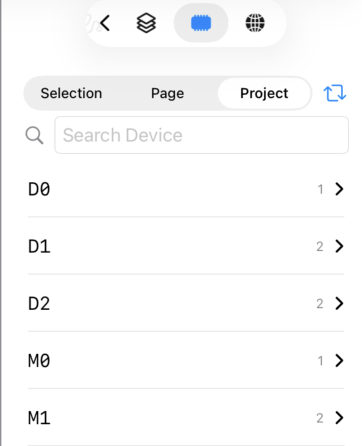
Device Manager displays a list of PLC devices used in the project.
Press the button
 at the bottom of the inspector to display the Device Manager.
Features
Device List
All device names used in the project, page, or selected items are listed.
Tap a device name to see details of where it is used (page, item, field).
Tap a usage entry to jump directly to that item and edit it in the object settings.
Scope Selection
Switch the display scope using the segmented control at the top of the screen.
-
Selection
Display only devices used in currently selected items -
Page
Display only devices used in the current page -
Project
Display all devices used in the entire project
Search
You can search for device names using the search field.
Prefix matching filters device names that start with the entered text.
Device Replace Wizard
Tap the
 button at the top of the screen to open the Device Replace Wizard.
You can batch-change device name prefixes or replace multiple devices at once.
Changes can be previewed before applying, allowing safe batch modifications.
Device Manager
YAML Export/Import
Device Manager supports exporting and importing device lists in YAML format. This allows bulk editing of device assignments using a text editor or AI tools.
Export
Tap the share button to export the current device list as a YAML file. The export scope follows the current view scope (Selection, Page, or Project).
Import
Tap the import button to load a YAML file and update device assignments in the project. Device names and titles are overwritten for existing items that match by UUID. Entries with non-matching UUIDs are skipped, so new items cannot be added through this import. If you need to add items, use YAML Project Format import instead. The number of updated items is displayed after import.
YAML Format
The exported YAML has the following structure:
# Device List - ProjectName

items:
  # Page 1
  - item_uuid: "C1325E46-..."
    page: "Page 1"
    item: Button
    title: Start
    alternate_title: ""
    devices:
      - field: device
        device: D100
      - field: switch
        device: M0
      - field: lamp
        device: M0
      - field: visible
        device: ""
      - field: interlock
        device: ""
Fields
| Field | Description |
|---|---|
item_uuid |
UUID of the page item (used for matching on import) |
page |
Page name (informational) |
item |
Item type (Button, Label, ValueField, etc.) |
title |
Item title (also updated on import) |
alternate_title |
Alternate title (also updated on import) |
devices |
List of device field assignments |
Device Field Types
| field | Item Types | Description |
|---|---|---|
device |
ValueField, Meter | Main device value |
switch |
Button | Switch (write) device |
lamp |
Button | Lamp (indicator) device |
interlock |
Button | Interlock device |
visible |
All items | Visibility control device |
editable |
ValueField | Edit permission device |
label |
Label | Label display device |
max_value |
ValueField | Maximum value device |
min_value |
ValueField | Minimum value device |
step_value |
SteppedValueField | Step value device |
figures |
Meter | Digit specification device |
major |
Meter | Major scale device |
minor |
Meter | Minor scale device |
message |
Message | Message condition device |
Usage Tips
- Export device list, bulk-edit device names in a text editor, then import to apply changes
- Use AI to generate device assignments from a specification document, then import the YAML
- Export as a reference for reviewing device usage across the project