Localization Manager
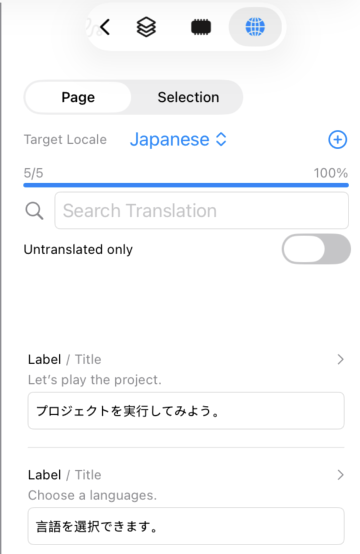
Localization Manager displays a list of translatable strings in the project and allows you to edit translations and check progress.
Press the button
 at the bottom of the inspector to display the Localization Manager.
Features
Translation List
All translatable strings in the project are listed.
Each entry shows the default value (base string) and a translation input field.
Translations are automatically saved when you type in the translation field.
Target Locale Selection
Select the target locale for translation using the locale picker at the top of the screen.
Translation progress (translated/total ratio) is displayed in a progress bar.
Add a locale using the locale menu before use.
Scope Selection
Switch the display scope using the segmented control at the top of the screen.
-
Selection
Display only translatable strings in currently selected items -
Page
Display only translatable strings in the current page -
Project
Display all translatable strings in the entire project
Search and Filter
You can search for strings using the search field.
Toggle "Untranslated only" on to display only untranslated items.
Translatable Fields
The following fields are translatable:
- Item title
- Item alternate title
- Unit (value field, meter)
- Message
- Detail message
- Message set title
- Message set summary
Navigation
Tap an entry's header (item name and field name) to jump directly to that item and edit it in the object settings.
Localization Manager
YAML Export/Import
Localization Manager supports exporting and importing translations in YAML format. This allows bulk editing of translations using a text editor, spreadsheet, or AI translation tools.
Export
Tap the share button to export translations as a YAML file. All configured locales are included in the export. The export scope follows the current view scope (Selection, Page, or Project).
Import
Tap the import button to load a YAML file and update translations in the project. Translation text is overwritten for existing items that match by UUID. Entries with non-matching UUIDs are skipped, so new items cannot be added through this import. The number of updated translation entries is displayed after import.
YAML Format
The exported YAML has the following structure:
# Localization - ProjectName

locales:
  - en
  - ja

pages:
  - page: "Page 1"
    items:
      - uuid: "C1325E46-..."
        type: Button
        title: Start
        fields:
          title:
            en: Start
            ja: スタート
          alternate_title:
            en: Stop
            ja: ストップ

messages:
  - uuid: "FBB22E64-..."
    set: "Alarms"
    fields:
      title_:
        en: Alarms
        ja: アラーム
      summary_:
        en: Alarm list
        ja: アラーム一覧
    items:
      - device_name: M100
        value: 1
        default: Motor overload
        field: message_
        translations:
          en: Motor overload
          ja: モーター過負荷
Structure
| Section | Description |
|---|---|
locales |
List of locale identifiers included in the export (e.g., en, ja, zh_CN) |
pages |
Translations grouped by page |
pages[].items[].uuid |
UUID of the page item (used for matching on import) |
pages[].items[].fields |
Translation fields (title, alternate_title, unit) with locale-keyed translations |
messages |
Translations for message sets |
messages[].fields |
Message set fields (title_, summary_) with locale-keyed translations |
messages[].items |
Individual message items with translations |
Translatable Fields
| Field Key | Target | Description |
|---|---|---|
title |
Page items | Item title |
alternate_title |
Page items | Alternate title (Button etc.) |
unit |
Page items | Unit label (ValueField, Meter) |
title_ |
Message sets | Message set title |
summary_ |
Message sets | Message set summary |
message_ |
Message items | Message text |
detail_message |
Message items | Detail message text |
Usage Tips
- Export translations, send to a translator or AI service, then import the completed translations
- Use AI to bulk-translate all strings into multiple languages at once
- Export as a reference to review translation completeness across the project