irBoard 3.0 New Features
irBoard 3.0 introduces many new features focused on improving design efficiency and multilingual support.
New Item
Matrix
A table-style item that displays and edits multiple device values in a grid layout.
- Configurable rows and columns
- Assign devices to individual cells
- Customize appearance with design templates
- Add borders and change colors
AI-Powered Screen Design
AI Import
AI automatically detects and places items from screen images created with drawing software.
- Automatically recognizes item types, positions, and sizes from images
- Import design images created with drawing software to recreate screens
Enhanced Multilingual Support
Localization Manager Inspector
A new inspector to manage all translatable text in one place.
- View and edit translation text for page items, message items, and message sets
- Easily identify missing translations
- YAML export/import for bulk translation editing with text editors or AI tools
For details on the localization feature, see Localization (Multilingualization) .
New Inspectors
Device Manager
An inspector to view and manage all devices used in your project.
- List all devices in use
- Check for duplicate or unused devices
- YAML export/import for bulk device assignment editing
Data Logging
Data Logging
Added the ability to automatically record PLC device values to CSV files.
- Create multiple configurations and record simultaneously
- Supports Time Series mode and Table mode
- Interval recording or bit trigger recording
- Auto-export in CSV / Excel format
- View and export sessions during runtime
- Import / export configurations via YAML / CSV
YAML Project Import/Export
YAML Project Format
Projects can now be created and edited using human-readable YAML text files, enabling AI-powered project generation.
- Export projects as YAML for review, version control, or editing
- Import YAML files to create or update projects
- AI-friendly format with comprehensive documentation for automated project creation
- Includes device lists, localization, message sets, and all item configurations
Usability Improvements
Multi-Selection Mode
Improved item selection behavior.
- Normal mode: Tap to select a single item
- Multi-selection mode: Double-tap to enter, then tap to add/remove items
- Tap an empty area to return to normal mode
- Cmd+A to select all (automatically enters multi-selection mode)
Item Enhancements
Meter Zones
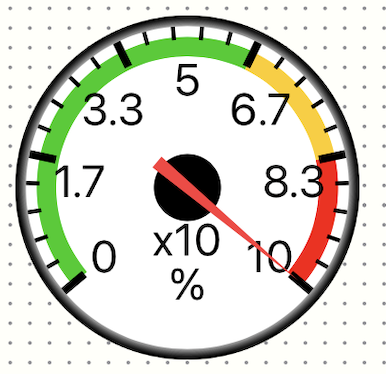
Meters now support colored zones to visually indicate value ranges.
- Define multiple zones with custom colors and value ranges
- Zones are displayed as colored arcs on the meter face
- Add zones individually or use the 3-zone preset (green/yellow/red)
- Fully supported in YAML import/export