Settings app
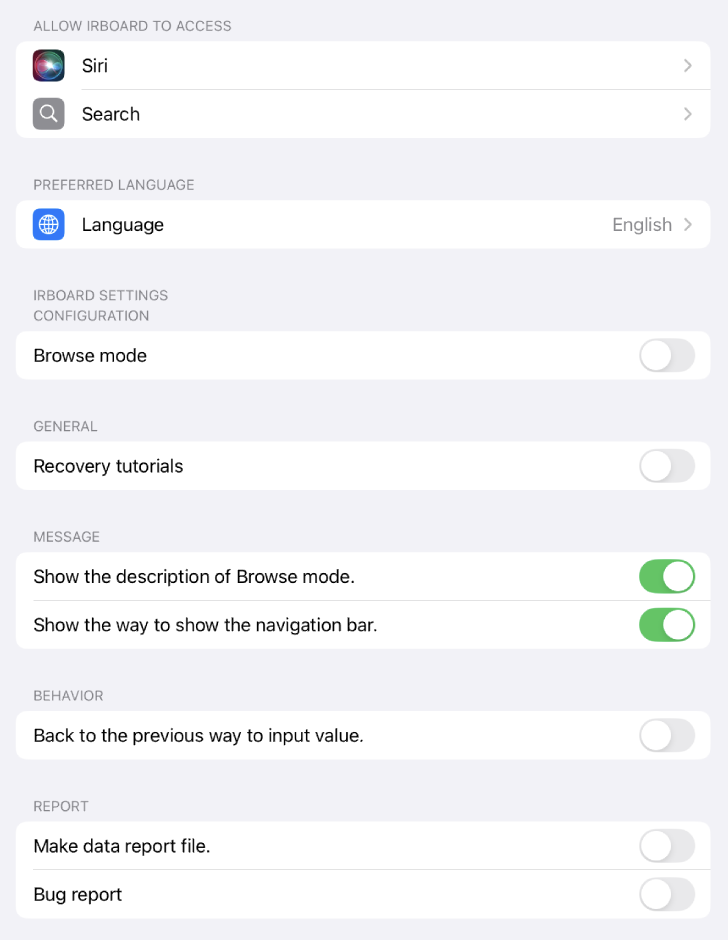
You can enable or disable irBoard tutorials in the Settings app.
- Launch the Settings app.
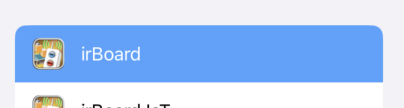
- Select the irBoard option.
- Settings
-
Brows mode
You are able to switch browse mode.
It cannot be disabled in the irBoard app, so it must be disabled in the Settings app. - General
-
Recovery tutorials
Restore the tutorial to its original state. -
Message
After selecting “No,” you can re-enable the following settings to display the description next time. -
Show the description of Brows mode.
-
Show the way to show the navigation bar.
-
Show the description of Lite edition.
-
behavior
-
Back to the previous way to input value.
Enable inline input of values. Disable to display a dialog view for entering the value. -
Report
-
Make data report file
Project data is copied to the document folder when the app starts. If you send us this file when a bug occurs, it may help us analyze the bug's location. -
Bug report
Logging takes place when a bug occurs, as long as it is enabled. When enabled, 'Bug Report” will appear in the information menu of the toolbar located within the project list. -
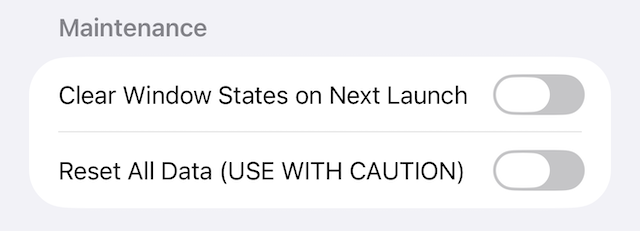
Maintenance
-
Clear Window States on Next Launch
Clears all stored window states when the app is next launched. This is useful for recovering from crashes caused by corrupted window state data. The setting is automatically turned off after the window states are cleared. -
Reset All Data (USE WITH CAUTION)
Deletes all project data when the app is next launched. This cannot be undone. The setting is automatically turned off after the data is reset.
Settings app
irBoard row
Configurations